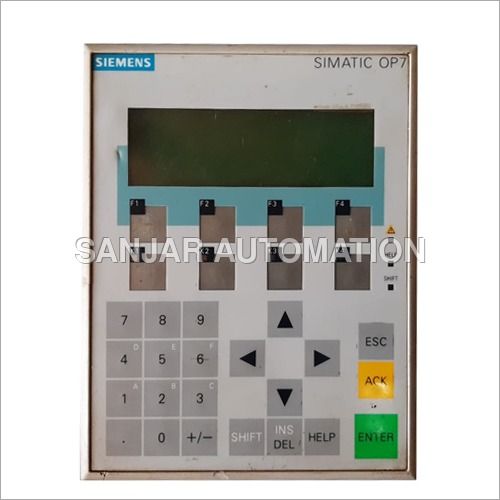
About SIMATIC OP7 HMI Display
The SIMATIC OP7 HMI Display enables a lean automation solution. It provides a powerful method to boost efficiencies in production processes. It eliminates construction costs by reducing wiring and components. It provides an integrated environment leading to faster machine design and propelling the next generation of machine control. This SIMATIC OP7 HMI Display leads to increased efficiency rate and reduces unnecessary process steps and equipments. Our company provides this system developed by highly trained and skilled experts at competitive price and manufactured with high quality raw material by keeping in mind the standard industrial norms.
Versatile Industrial Control PanelThe SIMATIC OP7 stands out as a compact yet powerful HMI solution designed specifically for industrial applications. Its sturdy build, combined with advanced features like programmable keys, an integrated microprocessor, and multi-protocol connectivity, ensure seamless monitoring and control processes in factories and automation setups. With user-friendly configuration via ProTool, the OP7 delivers flexibility and efficiency in managing machine operations.
Reliable Performance and DurabilityWith an IP65-rated front panel, the OP7 is designed to withstand harsh industrial environments and resist dust and water. Its plastic and metal casing adds to its strength, while the LED-backlit display ensures readability under various lighting conditions. Operating reliably across temperatures from 0 to 50C, the panel is both dependable and energy efficient, making it suitable for continuous duty in critical automation applications.
FAQ's of SIMATIC OP7 HMI Display:
Q: How do I program the SIMATIC OP7 HMI Display?
A: You can program the SIMATIC OP7 using Siemens' ProTool software. This tool allows you to configure screen layouts, assign functions to keys, set up message and alarm displays, and customize language options. Once programming is complete, the configuration can be downloaded to the panel through supported communication ports.
Q: What are the main benefits of using the SIMATIC OP7 in industrial machine control?
A: The OP7 offers several benefits, including compact panel-mount design, easy operation through function and system keys, robust IP65-rated front protection, and clear visual feedback with its LED-backlit, monochrome display. It enhances user interaction, increases operational safety with password protection, and provides reliable message and alarm monitoring.
Q: When should I consider deploying the SIMATIC OP7 for my automation setup?
A: The OP7 is best suited for situations that require rugged operator interfaces for machinery. It's ideal when you need efficient, panel-mount monitoring and control, multi-language support, password security, and compatibility with automation protocols like RS-232, RS-485, and MPI.
Q: Where can the SIMATIC OP7 be mounted within industrial environments?
A: This panel is designed for panel-mount installations within industrial control cabinets or operator stations. Thanks to its IP65-rated front, it can be positioned in locations exposed to dust, moisture, or mechanical impacts while safeguarding user inputs and display integrity.
Q: What is the process to connect the OP7 HMI to automation devices?
A: The OP7 supports standard industrial connectivity through RS-232, RS-485, and MPI interfaces. You will typically connect the panel to programmable logic controllers (PLCs) or other automation devices using suitable cables-up to approximately 15 meters in length, depending on your installation.
Q: How does the OP7 manage data and ensure secure access?
A: The OP7 uses a 64 KB EEPROM for data storage, safeguarding configurations and logs even during power loss. It supports password protection, ensuring that only authorized personnel can access critical settings or sensitive machine controls, thereby maintaining operational security.







 Send Inquiry

 Send Inquiry